Add people
Create a card with a name and color. Add an image if you want a more visual chart.
Connect characters with lines.
Visualize every relationship on one page.
Map your OCs, story casts, and TTRPG parties with labeled arrows and custom character art. Start free—no sign-up required.
Built for people who do not want to fight with image editors just to place people, lines, and relationship labels neatly.
Need accounts, cloud saving and sharing? Try characterchart.com — our new tool built for English-speaking creators.
Use the flexible general editor as a relationship generator when you want to add people and labeled connections quickly, then rearrange everything until the structure reads clearly. For stories, a character relationship chart maker helps clarify roles, rivalries, family ties, and romantic links. For larger casts or networks, the relationship map maker and relationship graph tool reveal hubs, clusters, factions, and bridges. To document how people, teams, and organizations connect, use the connection chart maker for people and organizations. For classrooms, research, or group analysis, a sociogram generator highlights choices, cliques, central members, and isolated people.
Each focused page leads to the same browser editor, with guidance tailored to that job. Start free without signing up, use a template if helpful, label each connection, and export a clean image when the chart is ready.
Free to start
7+ people, watermark-free export, PDF export, and AI diagrams are available with Premium — from $4.99/month or $19.99 lifetime.
Recommended — Lifetime plan
$19.99, yours forever. One-time payment, no subscription, no auto-renewal. Costs about 4 months of the monthly plan and unlocks Premium for good.
What kind of chart are you making?
Designed around the parts that slow people down
Creating a chart is not just about placing people. Time disappears into redrawing lines, fixing layout, and turning the result into something you can share. This tool keeps that work inside the browser.
Move people around while keeping relationship lines and labels easy to adjust.
Use colors and auto-arrange to keep main characters, allies, rivals, and factions clear.
Add people, move cards, and edit relationship lines with touch-friendly controls.
Save the finished chart as an image instead of relying on screenshots.
Bring your original characters and their connections together
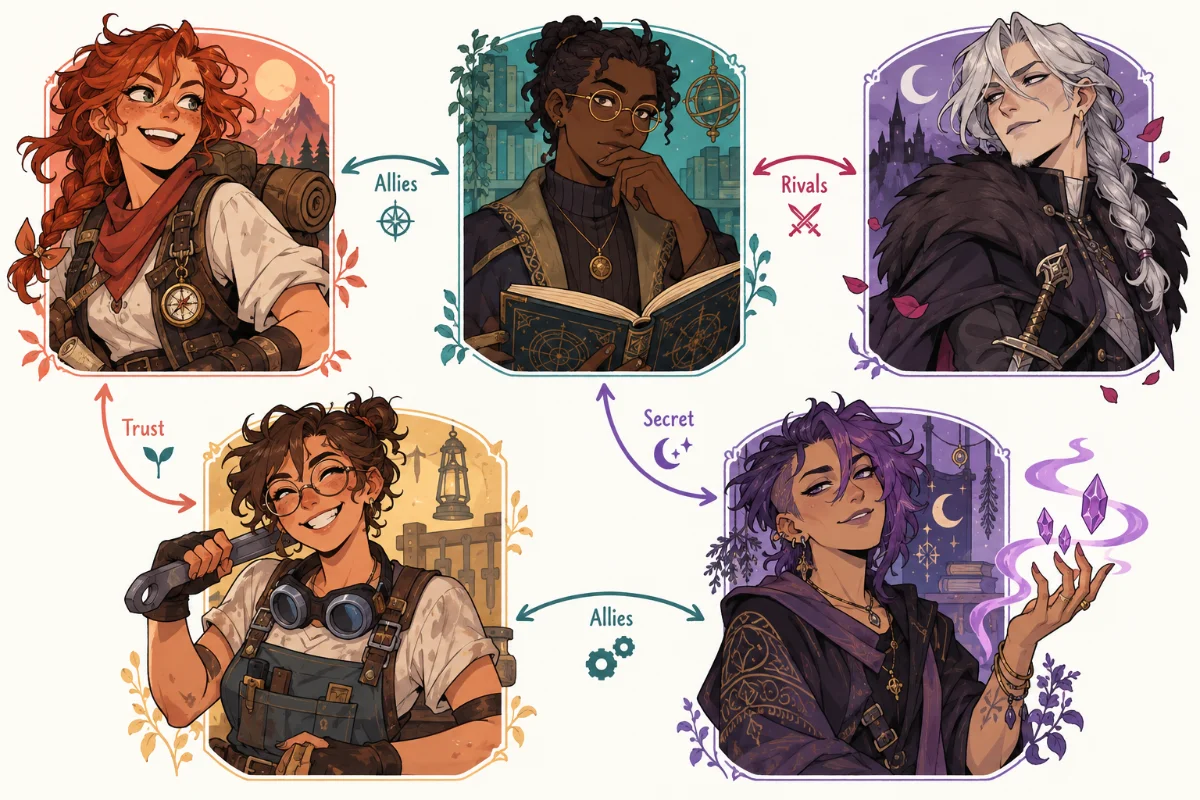
Create a card with a name and color. Add an image if you want a more visual chart.
Add labels such as friend, rival, mentor, crush, parent, or any wording that fits your story.
Save the whole chart as an image or keep editing it later in the same browser.

Create a relationship chart visually. No design tool or technical setup required.

Use colors, names, labels, and uploaded images to match your cast or project.

Your work is saved in your browser, so you can close the tab and come back later.

Export the chart as an image and share it in posts, chats, notes, or documents.

Premium adds PDF export for presentations, documentation, and printing workflows.

Core editing and HD image export are free. Upgrade only when you need Premium tools.
Recommended for
Turn complicated people, roles, and factions into a chart you can scan.
Understand complicated alliances, rivalries, and romances at a glance.
Map character dynamics before plot details become hard to track.
Clarify roles, dependencies, and decision-makers in one shared view.
Organize relatives, generations, and important connections clearly.
Track player characters, NPCs, factions, and shifting alliances.
Visualize clients, partners, and stakeholders before a meeting.
No sign-up, browser-based, image export included
Enter names, pick colors, and add images when you want a visual cast list.
Choose two people and add a label such as friend, rival, parent, or mentor.
Drag cards freely, or use auto-arrange when you want a quick readable layout.
Export as an image and share the chart with readers, players, teammates, or family.
Choose an OC cast, a ship chart, or a TTRPG party. The same characters and relationships open in the editor, ready to rename.
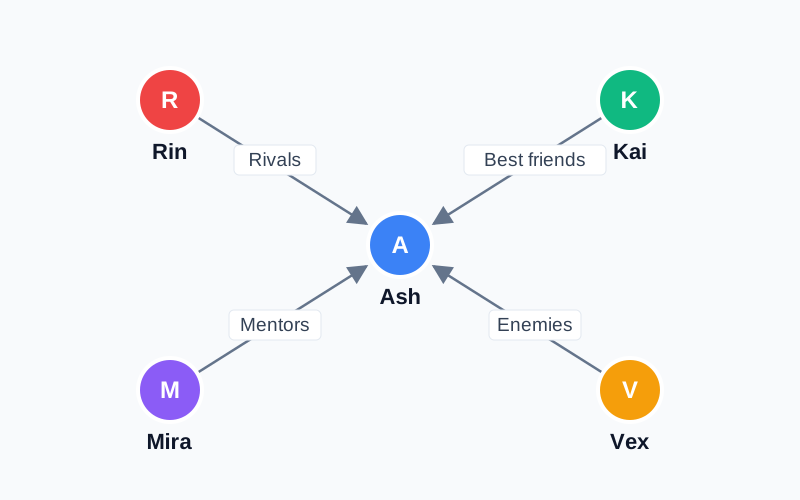
5 characters · Free to edit
Follow a protagonist, rival, best friend, mentor, and enemy. Rename the cast to fit your world.
Edit this example →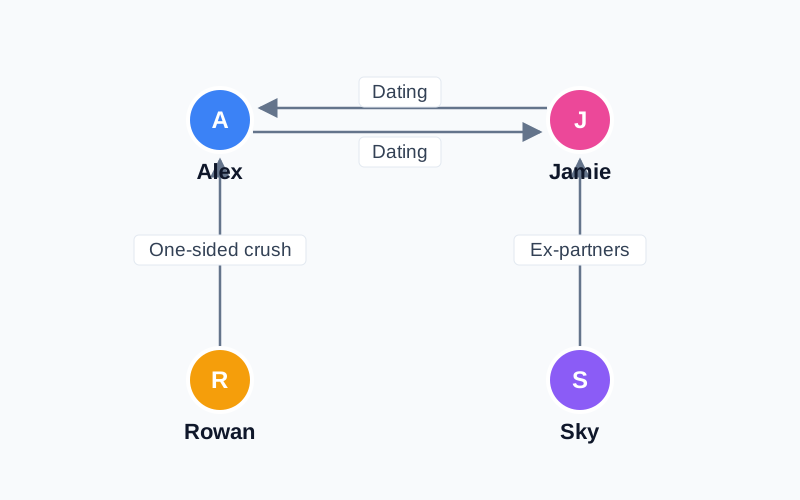
4 characters · Free to edit
Start with a couple, a one-sided crush, and an ex. Opposite arrows show mutual feelings.
Edit this example →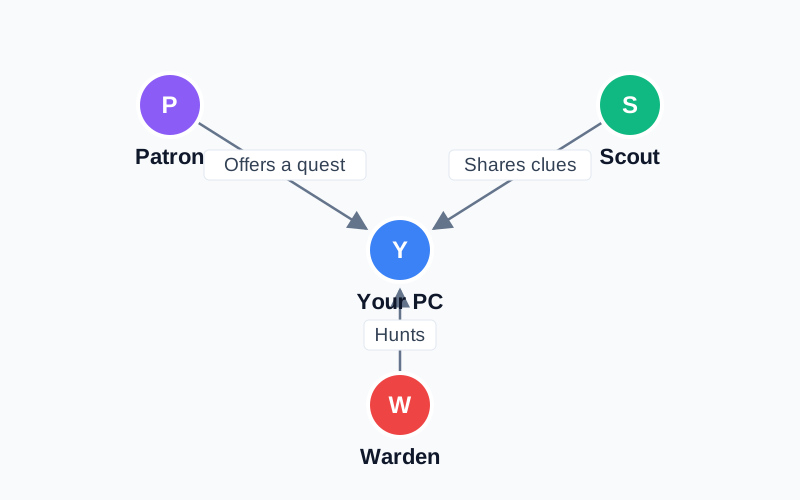
4 characters · Free to edit
Connect your player character to a quest giver, friendly scout, and hostile warden.
Edit this example →All three examples fit the free plan: up to 6 characters and PNG export with a watermark. If you already have a chart open, you can cancel before replacing it.
Browse all templates, including family and team charts · Start with a blank chart
Organize your novel's cast, map out manga character dynamics, or chart TRPG NPC connections. A free tool built for storytellers. Whether you're outlining a complex plot or mapping your favorite fandom, this tool helps you visualize every alliance, rivalry, and secret bond in one clear diagram.
A relationship chart (also called a relationship diagram, character map, or character chart) is a visual that shows how multiple people, characters, or groups are connected to each other. Each person is drawn as a node, and the lines between them represent relationships such as friendship, family, romance, rivalry, or workplace hierarchy. Optional labels and arrows describe the nature and direction of each relationship.
If you need to see several kinds of connections across characters, factions, or family branches at once, use the dedicated relationship map maker. This page remains the general-purpose chart maker; the map guide focuses on reading a larger network as a whole.
What makes relationship charts so powerful is that they let you take in dozens of connections at a single glance. The same information explained in paragraphs would take pages of text and would still be hard to follow. With a chart, the entire structure of a story, a family, or a team becomes visible at once — making it obvious who the central figures are, where the conflicts sit, and which characters bridge different groups.
Beyond visualization, building a relationship chart is a thinking tool. The act of laying out characters forces you to surface assumptions, spot missing links, and notice imbalances. Writers often build a chart during the outlining stage of a novel for exactly this reason: contradictions in the plot become visible long before they reach the page.
Relationship charts often get pigeonholed as "just for anime fans" or "just for novelists", but the actual use cases are much broader. Below are four of the most common ways people use this free relationship chart maker, with concrete examples for each one.
Long-running shows with sprawling casts — think prestige dramas, Korean series, fantasy epics, anime — can be exhausting to follow when you take a break and come back weeks later. Building a quick relationship chart of who's allied with whom, who's in love with whom, and who is secretly working against whom lets you re-enter the story without scrubbing through episodes. Many viewers also use these charts as a jumping-off point for fan blogs, recaps, and review videos.
For writers, a relationship chart sits right next to the character bible as an essential planning tool. Because relationships shift over the course of a story, many writers actually build three charts — one for the beginning, middle, and end — so they can verify that every shift in alliance, betrayal, or romance is properly set up. This is invaluable for catching plot holes before you commit them to a draft. The same workflow applies to webcomics, screenplays, fanfiction, TTRPG (D&D) campaigns, and original character (OC) lineups.
When you join a new team or step into a new project, the hardest part isn't the work — it's figuring out who matters, who reports to whom, and who actually has decision-making power. A relationship chart can capture an org structure, a cross-functional project team, or a network of clients and partners in a single image that's far more useful than a static slide. Consultants, account managers, recruiters, and product managers all use this kind of chart to onboard themselves quickly and to brief teammates.
History students wrestling with "who married whom in the Tudor dynasty" or "how did Caesar, Pompey, and Crassus actually relate" find it much easier to remember those relationships when they draw them out instead of memorizing them from a textbook. The same applies to mythology, literature courses, social science research, and even genealogy projects where you want to map your own family tree across several generations.
One of the most common reasons people search for a free relationship chart maker is to organize their original characters (OCs) or to map out the connections between characters in their favorite fandom. This tool is specifically designed to make those use cases easy.
This relationship chart maker works fully on smartphones and tablets. Open Safari, Chrome, Edge, or Firefox, navigate to the page, and you can start building immediately — no app store, no install, no account. Every interaction (adding people, drawing lines, editing labels, dragging things around) is optimized for touch, so the tool feels just as natural with a finger as it does with a mouse.
This makes it perfect for capturing ideas on the go: jot down a quick character map on the train, sketch out a project's stakeholder web during a meeting, or brainstorm a fanfiction lineup from bed. Autosave keeps your chart in the same browser on the same device. To move an editable copy to another device, create a share link and open it there. Changes to those copies do not automatically sync. iPads and Android tablets work great too — many users prefer them for longer charts because the bigger screen makes complex layouts easier to read.
Yes. The free plan includes editing up to 6 characters and HD PNG export with a watermark, with no sign-up required. Premium adds 7+ characters, watermark-free export, and PDF export. Choose a monthly subscription or a lifetime purchase.
Autosave stores your chart in this browser on this device. Clearing site data can erase it. Creating a share link sends a copy to our server so the link can open it; anyone with that link can view the shared copy. Posting to the gallery makes the chart public. Export an image for a visual backup, or use a share link to move an editable copy to another device. Separate copies do not automatically sync.
Each person and each relationship has its own delete button, so you can remove items individually. If you want to wipe the whole chart and start over, use "Reset All Data" in the side panel. Deleted items can't normally be recovered, but if you delete something by accident you can press Ctrl+Z (or ⌘+Z on Mac) to undo the last few actions.
Yes — the entire interface is fully responsive and optimized for touch input. You can add people, draw relationship lines, edit labels, and rearrange layouts using just your finger on iPhone, Android, iPad, or any tablet. There is no separate mobile app to install: just open Safari, Chrome, Edge, or Firefox and the tool works immediately.
The free plan supports up to 6 people per chart, and Premium supports 7 or more people for larger charts. For readability, charts with 10 to 20 people are often easiest to scan; for very large casts, split the chart by storyline, family branch, or faction.
Yes, charts you create with this tool are free for any use, commercial or non-commercial. You can publish them in books, blog posts, YouTube videos, slide decks, paid newsletters, novels, or product launches. Crediting "soukanzu.jp" is appreciated but not required. The only thing we ask is that you don't redistribute screenshots of the tool itself as if they were your own product.
Yes — OC relationship charts are one of the most common use cases. You can color-code different characters, upload custom artwork as their avatars, group them by storyline or faction, and label every connection with whatever relationship type fits your world (allies, enemies, family, exes, mentors, etc.). Many writers build several separate charts for different groups of OCs and link them mentally rather than crowding everything into one image.
A family tree is a specific type of relationship chart that focuses only on biological and marital connections — parents, children, siblings, spouses — usually arranged in a strict generational layout. A general relationship chart is broader: it can include friendships, rivalries, business partners, mentors, exes, classmates, and anything else. This tool can do both: just use vertical layouts and "parent/child/spouse" labels for a family tree, or use free-form positions and any labels you like for a general relationship chart.
Yes. Free HD PNG export includes a watermark and works for slides, posts, and printing. Premium adds watermark-free export and PDF export, available during an active monthly subscription or with a lifetime purchase.
Export a PNG to share an image, or create a share link to let someone open an editable copy. A share link sends a copy of your chart to our server; anyone with the link can view it. Each person edits a separate copy, so later changes do not automatically sync. Remove spoilers or private details before sharing.