How to Make a Ship Chart: Free Template Ideas for Fandoms & OCs
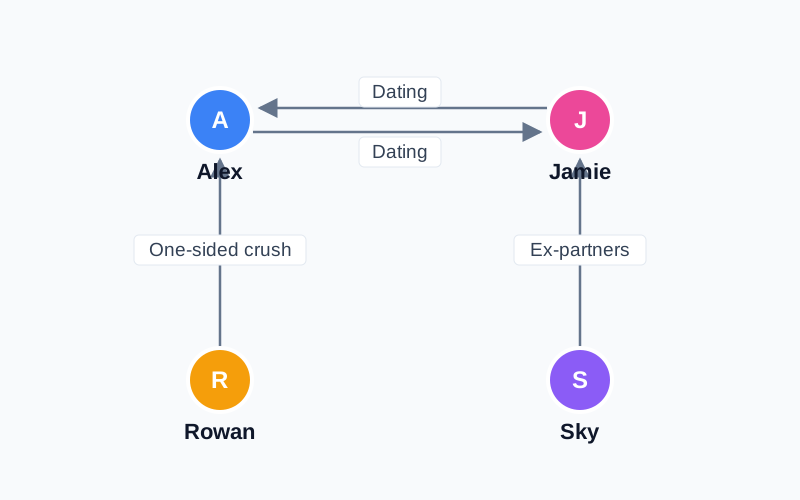
A ship chart (also called a shipping chart or CP map) shows who is paired with whom in a story: canon couples, crushes, exes, rivals, and the “what if” pairings fans love to argue about. This guide shows how to make one that people can read at a glance, whether it is for a fandom, a group of original characters (OCs), or your own novel.
What to put on a ship chart
- Characters: keep it to the people who matter to the pairings. Six to ten is easy to read; more than that gets crowded.
- Ship lines: one line per pairing, with a short label such as “canon”, “one-sided”, “exes” or “rivals to lovers”.
- Direction: use an arrow when the feeling is one-way, and a plain line when it is mutual.
- Color: give each side, friend group or faction a color so the clusters are obvious.
Make a ship chart in 5 steps
- Open the editor. Start from the Romance template for a ready-made love triangle, or from a blank canvas if you already know your cast.
- Add your characters. Type each name, then add a character image or pick a color.
- Draw the ships. Connect two characters and label the line. Use an arrow for one-sided crushes.
- Arrange the layout. Put the most-shipped character in the middle and let the pairings fan out around them. Use “Auto arrange” if the lines cross too much.
- Export a PNG. Save the image and post it. The free export includes a small soukanzu.jp watermark; Premium removes it.
Tip: label every line with one or two words. A chart with unlabeled lines looks tidy, but nobody can tell a crush from a rivalry.
Three ship chart layouts that work
Love triangle
Put the person in the middle at the top and the two rivals below, one on each side. Draw a line from the middle to each rival, plus a rivalry line between the two. Four characters are enough for a classic triangle.
Friend-group web
Arrange six to eight characters in a circle. Use thin gray lines for friendships and a bold colored line for the couples, so the romantic ships stand out from the rest.
OC ship chart
Use your own characters’ art as the nodes. Group each OC’s friends and crushes by color, and add short labels like “childhood friends” or “secret crush”. See the template gallery for OC starting points.
Sharing your ship chart
Export at the default size for social posts. If you want a cleaner image for a wiki or a profile page, Premium exports without the watermark and also supports PDF and SVG. Keep in mind that a chart with many characters is hard to read on a phone screen, so consider splitting a big cast into two charts.
FAQ
What is a ship chart?
A ship chart is a diagram of the relationships and pairings between characters, usually romantic ones, drawn as names connected by labeled lines.
Is the ship chart maker free?
Yes. You can create and export a ship chart for free with up to 6 characters, with no sign-up. Charts with 7 or more characters and watermark-free export are Premium features.
Can I use my own character images?
Yes. Each character can use an uploaded image, so OC and fandom charts can show real character art.
Ready to try it? Build your first ship chart in a few minutes.
Open the Ship Chart Maker