OC Relationship Chart Template
Your cast, mapped in minutes
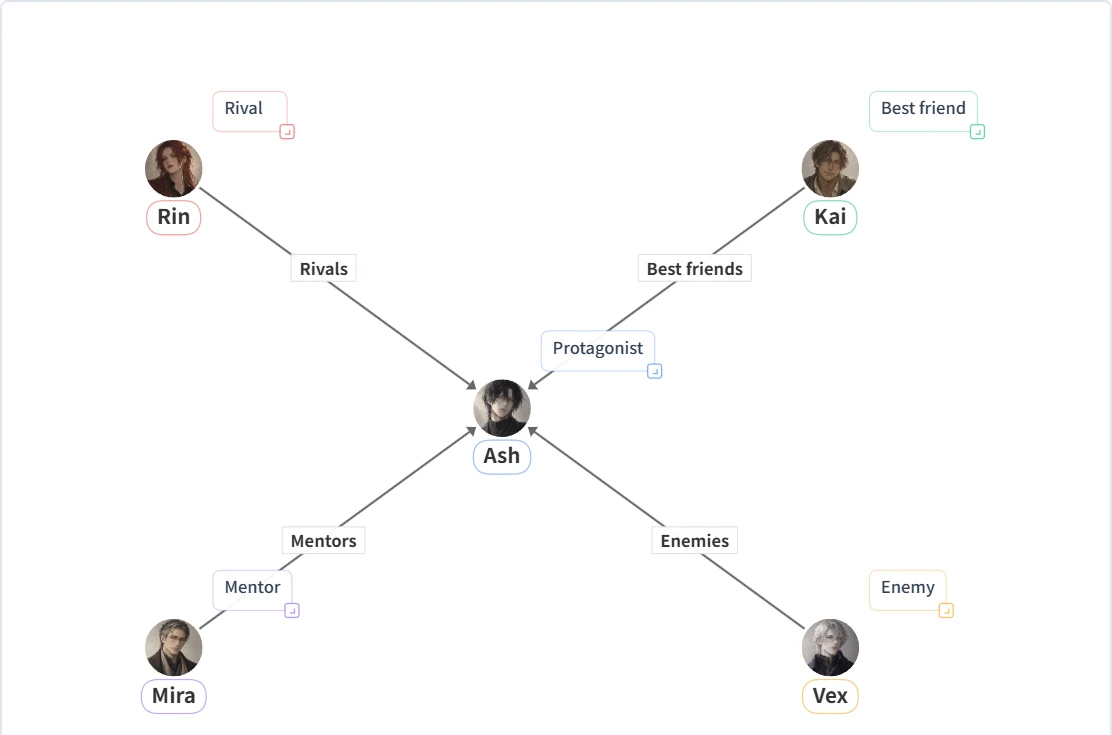
This free OC relationship chart template starts with five classic story roles already connected: a protagonist, a rival, a best friend, a mentor, and an enemy. Rename them, drop in your own character art, relabel the lines, and you have a clean chart of your original characters ready to post or keep in your worldbuilding notes.
Works on phone & desktop · Auto-saves in your browser · Your art stays on your device
What's in the template
The template is built around one central character with four others pulling on them from different directions. That layout works for most stories: it shows at a glance who supports your protagonist, who opposes them, and who sits somewhere in between.
| Placeholder | Role | Line to the protagonist | Replace it with |
|---|---|---|---|
| Ash | Protagonist | — | Your main OC, placed in the center |
| Rin | Rival | Rivals | The character who competes with or mirrors your lead |
| Kai | Best friend | Best friends | The loyal ally, sidekick, or found-family anchor |
| Mira | Mentor | Mentors | The teacher, guardian, or older character with history |
| Vex | Enemy | Enemies | The antagonist or the person your lead can't forgive |
Turn the template into your OCs in 4 steps
Rename and recolor
Tap a character to change the name and color. Use one color per faction, family, or friend group so the chart reads before anyone looks at the lines.
Add your character art
Upload a portrait for each OC from the character's image menu. Images stay in your browser; they are not uploaded to a server.
Rewrite the lines
Change "Rivals" or "Mentors" to what is actually going on: "owes a life debt," "secretly siblings," "sworn to protect." Use an arrow when the feeling only goes one way.
Add the rest of the cast
Add side characters around the outside, then export a PNG for your profile, art post, or Discord server.
Relationship labels that work well for OCs
Short labels stay readable when the chart is shrunk down in a feed. These are the ones OC creators reach for most.
Bonds
Found family, childhood friends, partners in crime, sworn siblings, roommates, comrades, mentor and apprentice.
Conflict
Rivals, nemesis, betrayed, owes a debt, hunting them, distrusts, used to be friends, frenemies.
Romance
Dating, married, one-sided crush, exes, arranged engagement, will-they-won't-they. For tangled romance, see the love triangle chart maker.
Secrets
Knows their real name, hiding a power, secretly related, spying on. Keep the secret in a note so you can hide it before posting.
Family
Parent, sibling, twin, adopted, step-sibling, estranged. Large families read better as a fictional family tree.
Power
Commands, serves, protects, contracted to, bound by oath, reports to. Useful for courts, guilds, and crews.
Three layouts for different kinds of casts
Hub and spoke. The default layout. One lead in the middle, everyone else around them. Best when your story follows a single main character.
Factions. Group characters by side or organization and draw a frame around each group. Lines that cross between frames become your story's tension points, so they are easy to spot.
Two leads. Put two protagonists side by side and arrange each one's allies on their own side. This works well for duos, rivals-to-allies stories, and shared OC universes with a friend.
If you also need to map friendships, families, or real-world teams beyond OCs, the general character relationship chart maker uses the same canvas with more starting points.
Already have character bios? Let AI draft the chart
If your cast already lives in a document, paste the bios or a short story summary into the AI Relationship Chart Generator. It reads the names and relationships from your text and builds an editable chart, so names come out spelled correctly instead of garbled like they often are in AI-generated images. Open the draft in the editor and finish it with your own art and labels.
FAQ
Is the OC relationship chart template free?
Yes. The template opens in the free editor with no sign-up. You can rename the characters, add your own art, relabel the lines, and export a PNG at no cost.
Can I add more than five OCs?
Yes. Add characters from the people panel. The free plan covers smaller casts; Premium is for charts with seven or more people.
Are my OCs and art uploaded anywhere?
No. Your chart and the images you add are saved in your own browser. Nothing is published unless you export an image or share a link yourself.
Can I keep spoilers out of the version I post?
Yes. Use tabs to keep a second copy of the chart, and mark the one with reveals as a spoiler. Post the spoiler-free tab and keep the full one for yourself.
Can I start from my character notes instead?
Yes. Paste your character bios or story notes into the AI Relationship Chart Generator and it drafts the people and lines for you, which you can then edit in the same editor.
Give your OCs a chart
Free, no sign-up, ready in your browser. The five roles are already in place; you just make them yours.
Open the OC template